Rick's Daily Tips

Your daily dose of practical, easy to follow tech tips!

  • Home
  • Rick’s Bio
  • Advertise
  • Privacy Policy
  • Rick’s Tip Jar
  • Get My Tech Tips Newsletter
  • Recommended Tech Gear
  • Contact Me

Q&A: Why can’t I get Netflix to stream in 4K?

Posted on August 14, 2020

Question from Perry:  I recently bought a high-end Windows PC from Best Buy.

Here’s a link to it so you can check the specs.

I asked the salesman what I would need in order to watch Netflix in 4K with that machine and he said a broadband Internet connection and some type of 4K compatible streaming device.

I told him I had a DSL connection and he said that’s fine. He then recommended that I buy a Chromecast Ultra, so I did.

He told me my new computer and the Chromecast Ultra would let me watch Netflix in 4K if I used the Edge browser.

However, no matter what I try I can never get Netflix to stream at anything faster than 1080p.

I went back to Best Buy and asked what else I need to do (or buy) to get Netflix in 4K and three different people insisted that I have everything I need.

Do you have any idea what could be the problem?

Rick’s answer:  [Read more…]

Q&A: Can I replace a bad power supply with one from another computer?

Posted on August 7, 2020

Note: The links in this post are affiliate links.

Question from Larry G:.  Rick, I have a two Gateway Desktop computers, neither of which are operational.

One has a bad motherboard and the other has a bad power supply.

Can I replace the bad power supply with the one in the computer that has the bad motherboard? If I can I won’t have to go buy one.

The power supplies look exactly the same and have the same cables and connectors, but the working power supply is rated at 400 watts and the bad one is only 350 watts.

I read your post about replacing Windows with Linux and I’d really like to get one of these machines working so I can install Linux Mint on it.

What I need to know is will replacing a power supply with a more powerful one damage a computer?

Rick’s answer:   [Read more…]
Q&A: How do I connect a second display to my iMac?

Posted on July 14, 2020

Note: The links in this post are affiliate links.

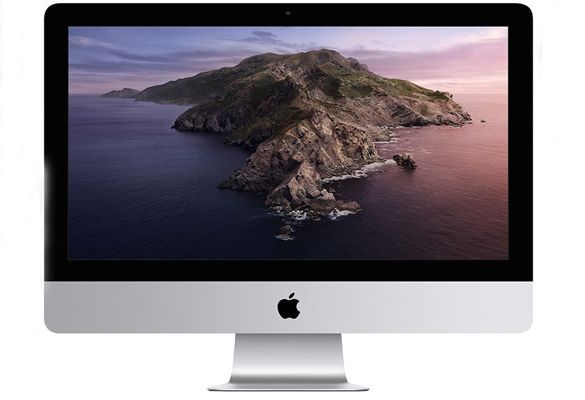
Question from Kelley:  I recently bought this 21.5 inch iMac and I’d like to connect a second display to it.

I have a really nice 1 year-old 27 inch HP monitor with two HDMI connectors that I used with my old Windows computer.

I’d love to use that monitor if I can.

My goal is to have Photoshop running on the 27 inch screen and everything else on the 21.5 inch screen.

Can you tell me if the HP monitor is compatible with the iMac? If it is, how do I connect it to the computer and set it up in the software?

If it won’t work with the iMac can you recommend a good 27 inch monitor that will?

Rick’s answer:  [Read more…]

Q&A: How can I remove the ‘News’ icon from the top of the Facebook app?

Posted on July 9, 2020

Question from Celeste:  I hope you can help me solve an irritating problem.

Every time I open my Facebook app on my phone there’s a little icon at the top with a number on it indicating there are updates for me to read.

When I tap that icon it displays a “News” page with several news stories on it. I always tap it just to clear away the number because I find it very distracting.

I don’t want to get my “news” from Facebook because I don’t trust it. Besides, I watch the news on TV and listen to it on the radio so I don’t need to get it from Facebook too.

Is there any way to remove that irritating “News” icon from the top of the Facebook app?

Rick’s answer:  [Read more…]

Q&A: Should I keep using Chrome or switch to the new Microsoft Edge browser?

Posted on June 30, 2020

Question from Judy:  When I purchased my PC with windows 10, it came with Microsoft Edge as the web browser.

I preferred using Google Chrome so I installed it and set it as my default browser.

The other day Windows updated and automatically installed a new version of Microsoft Edge.

Now I’m not sure if I should keep Chrome as my default browser or use Edge. What do you recommend?

Also, should I delete whichever one I decide not to use?

I would appreciate your thoughts on which is the best way to go. Thank you.

Rick’s answer:  [Read more…]

  • « Previous Page
  • 1
  • …
  • 155
  • 156
  • 157
  • 158
  • 159
  • …
  • 259
  • Next Page »

– Ad –
Beelink SER3 Mini PC with W11 Pro

I’ve been using mini PCs exclusively in my office for over three years and I doubt if I will ever go back to a full-size or mid-size desktop computer.

The power and capabilities they pack into these things is nothing less than astounding. In a nutshell, you get full desktop power in a machine that’s about the size of a brick.

This little gem from Beelink is an exceptional value for the money in my humble opinion. It comes with an AMD Ryzen 3 3200U CPU, 16GB DDR4 RAM and a super-fast 500GB NVME SSD. The Windows 11 Pro is a nice bonus as well.

Click here to check it out at Amazon.


Popular…

Miss one of my Daily Gadget Picks? Check here.

How do I ask you a tech question?

Step-by-step guide to completely ridding your PC of viruses and other malware

10 reasons why I recommend buying tech gear from Amazon

How to accurately evaluate product reviews on Amazon


Advertise

Guest Post Guidelines

Want to ask me a tech question?

Recommended Tech Gear

Privacy Policy

Computer Tips
Smartphone Tips
Blogging Tips

Tech Q & A
Reviews
Tech News

Write for RicksDailyTips.com

Scam alerts
Downloads

Copyright © 2026 RicksDailyTips.com

Affiliate Disclaimer


Rick's Daily Tips is hosted by InMotion Hosting. Click here to find out why.

This blog uses cookies to ensure that you receive the best experience on my website. Please click 'Accept Cookies' to continue.