Rick's Daily Tips

Your daily dose of practical, easy to follow tech tips!

  • Home
  • Rick’s Bio
  • Advertise
  • Privacy Policy
  • Rick’s Tip Jar
  • Get My Tech Tips Newsletter
  • Recommended Tech Gear
  • Contact Me

Q&A: How do I take a screenshot on my Galaxy S5?

Posted on June 13, 2014

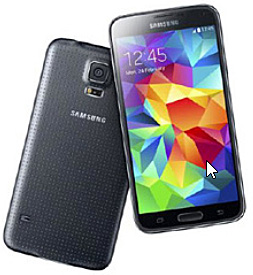
samsung-galaxy-s5Question from Elisa M.:  Hi Rick. I just ditched my old phone that I’ve had for years and bought a new Samsung Galaxy S5. I like taking screenshots with my phone from time to time, but I can’t figure out how to do it with this one.

Can you tell this dummy how to take a screenshot with a Galaxy S5? LOL – and thanks!

Rick’s answer:  You’re not a dummy Elisa. If you don’t know how to do something, you don’t know how to do it. That’s why every day offers new opportunities to learn. And believe me, I learn something new every day!

To answer your question, it’s pretty easy to capture a screenshot on the S5 once you know how. Here are the steps:  [Read more…]

Q&A: Is there a way to display the menu bar in Windows Media Player with Windows 7?

Posted on May 28, 2014

windows-media-player-logoQuestion from David:  Unlike the Windows Media Player included in Windows Vista Home Premium, the version in Windows 7 Home Premium on my Samsung laptop does not have a Menu Bar. Is there a way to add or enable one?

Rick’s answer:  Try this David:

1 – Launch Windows Media Player.

2 – Press the Alt key by itself and you’ll see a menu pop up.

3 – Click the Show menu bar option.

Note: Pressing the Alt key in most Windows programs will display the “File menu” in situations where it isn’t already displayed by default.

That should do it David. Please let me know if it works for you.

Update from David:  Yes it does. Many thanks.


Do you have a tech question of your own for Rick? Click here and send it in!

Q&A: What kind of hard drive do I need for an HP Pavilion Elite HPE-120f desktop PC?

Posted on May 27, 2014

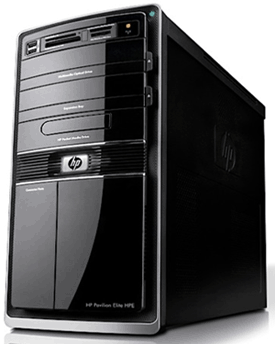
hp-pavilion-elite-hpe-120fQuestion from David H.:  My brother gave me his old HP Pavilion Elite HPE-120f desktop computer after the hard drive died. The shop returned the computer to him without the hard drive in it and I need to know what kind of hard drive to buy for it.

Also, I don’t have a set of factory Restore discs for this computer. Will HP send me a set?

Thanks in advance for your help.

Rick’s answer:  David, your HP Pavilion Elite HPE-120f most likely came from the factory with a 1TB SATA hard drive, so virtually any 3.5″ SATA hard drive will work in that system.

That being said, instead of simply installing another hard drive, I recommend installing a solid state drive (#ad) as the boot drive and a spacious hard drive as a secondary data drive. [Read more…]

Q&A: How do I stop AVG Antivirus from blocking a game?

Posted on May 16, 2014

avg-logoQuestion from Nelson F.:  Rick, I installed “Need for Speed” on my computer and every time I try to run it my AVG Antivirus program blocks it. How can I stop this from happening?

I really like AVG, but I’ll gladly give it up if I have to because I like Need for Speed more!

Rick’s answer:   [Read more…]

Q&A: How can I force my USB drive to use same drive letter no matter which PC I plug it into?

Posted on May 14, 2014

usb-3-0-thumb-driveQuestion from Gary M.:  I have my photos and Lightroom catalog on my USB drive and move them from my laptop to desktop. It would make my life easier if it presented as the J: drive every time it’s plugged into either machine.

How can I force my external USB drive to present itself as the same drive letter every time it’s plugged in no matter which PC I plug it into?

Rick’s answer:   [Read more…]

  • « Previous Page
  • 1
  • …
  • 224
  • 225
  • 226
  • 227
  • 228
  • …
  • 258
  • Next Page »

– Ad –
 
QINLIANF 5 Outlet Surge Protector w/ 4 USB Charging Ports

This little gem instantly converts a standard 2-outlet 120V receptacle into a full-blown power distribution system.

Click here to check it at Amazon.


Popular…

Miss one of my Daily Gadget Picks? Check here.

How do I ask you a tech question?

Step-by-step guide to completely ridding your PC of viruses and other malware

10 reasons why I recommend buying tech gear from Amazon

How to accurately evaluate product reviews on Amazon


Advertise

Guest Post Guidelines

Want to ask me a tech question?

Recommended Tech Gear

Privacy Policy

Computer Tips
Smartphone Tips
Blogging Tips

Tech Q & A
Reviews
Tech News

Write for RicksDailyTips.com

Scam alerts
Downloads

Copyright © 2026 RicksDailyTips.com

Affiliate Disclaimer


Rick's Daily Tips is hosted by InMotion Hosting. Click here to find out why.

This blog uses cookies to ensure that you receive the best experience on my website. Please click 'Accept Cookies' to continue.