Rick's Daily Tips

Your daily dose of practical, easy to follow tech tips!

  • Home
  • Rick’s Bio
  • Advertise
  • Privacy Policy
  • Rick’s Tip Jar
  • Get My Tech Tips Newsletter
  • Recommended Tech Gear
  • Contact Me

Q&A: How can I keep my 4 year old from exiting Internet Explorer?

Posted on August 16, 2013

ieQuestion from Andrea L.:  Hi Rick. I have a problem and I’m betting you might be able to help me solve it.

My 4 year old daughter likes playing the games on the PBS Kids website (https://pbskids.org). The problem is she isn’t the best at controlling the mouse yet and she sometimes accidentally leaves Internet Explorer and starts click in places where she doesn’t need to be clicking. Last night I caught her clicking around the Control Panel!

Is there a way to force her to stay within the confines of the web browser? The computer runs Windows 7 if that makes a difference. Thanks so much for your help!

Rick’s answer:   [Read more…]

Memo to Microsoft: Users just aren’t that interested in touch screens on laptops and desktop PCs

Posted on August 13, 2013

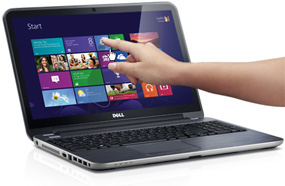
touch-screen-laptopI found it odd when Microsoft decided to make the touch screen-friendly tiles of the new Start Screen the primary selling point of Windows 8.

To this day I still haven’t figured out why the folks in Redmond thought of laptop and Desktops PC users would ever prefer “touching” their computer screens over using their mice and keyboards.

Well, it turns out that I’m not the only person who feels that way. [Read more…]

Q&A: Why is ‘Burn disc image’ missing when working with ISO files?

Posted on August 12, 2013

blank-dvdQuestion from Nathan E.:  Hi Rick. I have a problem that I can’t seem to figure out. I’m hoping you can help me.

I work with a lot of ISO files that I download from the web and then burn onto writable CDs and DVDs. Until recently I could right-click on an ISO file and click “Burn disc image” and Windows’ built-in CD/DVD burner utility would create a bootable disc.

Alternatively, I could get “Burn disc image” to show up as a menu item in Windows Explorer by simply clicking on the name of the ISO file.

I don’t know what happened, but starting a few days ago the “Burn disc image” option fails to appear regardless of which of the above-mentioned methods I try. Can you help me get it back? I’ll be much in your debt if you can! My laptop is running Windows 7. Thanks!

Rick’s answer:   [Read more…]

Q&A: How do you kill a stuck process in Ubuntu Linux?

Posted on July 31, 2013

ubuntu-logoQuestion from Keith:  I recently built a computer from scratch and I decided to install Ubuntu Linux on it instead of buying a copy of Windows. It’s a pretty steep learning curve for me, but I’m enjoying it immensely.

I have a problem that I hope you can help me with. I’m using Firefox for my web browser and every now and then it hangs up, causing me to have to reboot the computer to clear it. Back in my Windows days I used the Task Manager to kill a stuck process, but something tells me that it won’t be quite that simple with Linux.

My question is this: How do you kill a stuck process in Ubuntu? Is there a Linux utility that I can download that works something like the Windows Task Manager?

Rick’s answer:   [Read more…]

Q&A: How can I force my laptop to connect via Ethernet instead of Wi-Fi by default?

Posted on July 30, 2013

wired-connectionQuestion from Bill T.:  Rick, my office doesn’t have Wi-Fi installed at all. For security reasons my company requires everyone to connect our laptops to the network via Ethernet (we have a cable at each desk).

The problem that many of us have is our laptops ignoring the wired Ethernet connection altogether and connecting to an open Wi-Fi network from the building next door.

What we all do at the moment is turn Wi-Fi off, but what we’d really like to be able to do is leave it on and have our laptops default to a wired connection whenever one is available. Can you tell me what settings to change in Windows 7 to make this happen? Your help will be very much appreciated. Thanks!

Rick’s answer:   [Read more…]

  • « Previous Page
  • 1
  • …
  • 245
  • 246
  • 247
  • 248
  • 249
  • …
  • 258
  • Next Page »

– Ad –
 
Samsung Galaxy Tab A11+ Tablet


Looking for a really good Android tablet with a large 11 inch screen?

Click here to check out this gem from Samsung.


Popular…

Miss one of my Daily Gadget Picks? Check here.

How do I ask you a tech question?

Step-by-step guide to completely ridding your PC of viruses and other malware

10 reasons why I recommend buying tech gear from Amazon

How to accurately evaluate product reviews on Amazon


Advertise

Guest Post Guidelines

Want to ask me a tech question?

Recommended Tech Gear

Privacy Policy

Computer Tips
Smartphone Tips
Blogging Tips

Tech Q & A
Reviews
Tech News

Write for RicksDailyTips.com

Scam alerts
Downloads

Copyright © 2026 RicksDailyTips.com

Affiliate Disclaimer


Rick's Daily Tips is hosted by InMotion Hosting. Click here to find out why.

This blog uses cookies to ensure that you receive the best experience on my website. Please click 'Accept Cookies' to continue.