Rick's Daily Tips

Your daily dose of practical, easy to follow tech tips!

  • Home
  • Rick’s Bio
  • Advertise
  • Privacy Policy
  • Rick’s Tip Jar
  • Get My Tech Tips Newsletter
  • Recommended Tech Gear
  • Contact Me

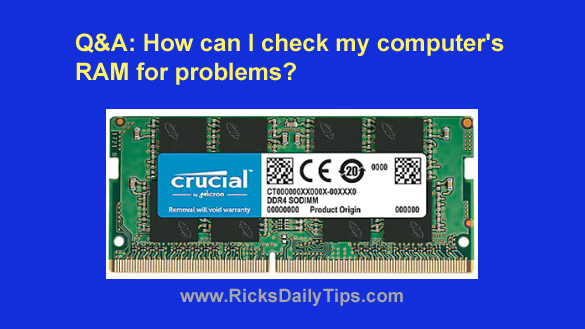
Q&A: How can I check my computer’s RAM for problems?

Posted on December 22, 2020

Question from Mac G.:  I have a four year old Acer laptop that recently started crashing to blue screens at random times.

A first it would only happen about once or twice a month but now they’re popping up at least once a day.

I thought it might be a software issue so I followed your instructions for resetting Windows 10 but that didn’t help. The blue screens continued popping up even with no programs installed.

My next thought is maybe my computer has a RAM chip that went bad.

First of all, what are your thoughts about the possibility of bad RAM being the problem?

And second, if you do suspect a RAM problem how’s the best way to check the RAM to see if it’s in fact bad?

Rick’s answer:  [Read more…]
How to disable the Control Panel and Settings app in Windows 10 (and why you might want to)

Posted on November 30, 2020

As you probably know, Windows 10 has both a Control Panel and a Settings app that make it easy to alter a plethora of Windows settings and features.

Unfortunately, these powerful tools also make it very easy for inexperienced users to make system changes that end up causing issues with either the Windows installation itself or the programs and apps that run under it.

[Read more…]

Q&A: Can I run my Android apps on a Windows PC?

Posted on November 20, 2020

Question from Kelly:  I’ve heard it’s possible to run Android apps on a Windows computer.

I have a couple of questions:

1 – Is that true?

2 – If it is, how do I do it?

I have a couple of apps on my phone that I use a LOT and I’d love to be able to use them on my Acer laptop with Windows 10.

Rick’s answer:  That’s a great question, Kelly. And as it turns out you can indeed run Android apps on a Windows PC! [Read more…]

Lookout Mobile Security: An outstanding free security app for your smartphone or tablet

Posted on October 28, 2020

Hackers have been relentlessly attacking PCs that run Microsoft Windows for years while largely ignoring computers running other operating systems.

Why? Because they enjoy inflicting misery and financial loss on as many people as possible while expending the least effort.

It’s simply the age-old principle known as economy of scale at work. Since there are more Windows PCs out there than anything else, they aim their malicious attacks at them in order to get the most “bang for their buck”.

While PC’s are still huge targets, now that smartphones and tablets are in virtually every pocket in America the hackers have turned their attention to those devices as well.

With that in mind, let me tell you about a free app called Lookout Mobile Security that offers outstanding security protection for iPhones, iPads and all types of Android devices.

[Read more…]

Q&A: Can you recommend a good ‘Screen Recorder’ app for Linux that’s easy to use?

Posted on October 3, 2020

Question from Earnie:  I’ve been following you on Facebook for a long time Rick, and I’ve learned a lot from the great info you post.

One post that really helped was the one where you basically said we need to ditch Windows 7 because it’s no longer being supported. I had no idea!

After reading that post and pondering my options for several days I finally took your advice and replaced the Windows 7 on my laptop with Linux Mint, and I believe it was a good move.

I checked your list of Linux replacements for Windows programs (very helpful, thanks!) for a screen recorder app but I didn’t see one listed.

I searched Google for Linux screen recorder apps and found several but all the ones I tried are too complicated for what I need.

All I need is a very simple app that can record everything that happens inside the active window.

Is there one that you can recommend?

Rick’s answer:  [Read more…]

  • « Previous Page
  • 1
  • …
  • 6
  • 7
  • 8
  • 9
  • 10
  • …
  • 26
  • Next Page »

– Ad –
 
Scosche FoundIT 32W Multi-Port Car Charger w/built-in Locator

This isn’t your normal car charger. It’s a fast charger with location services built in. It’ll tell you right on your smartphone where your vehicle is parked / located at all times.

Click here to check it out at Amazon.


Popular…

Miss one of my Daily Gadget Picks? Check here.

How do I ask you a tech question?

Step-by-step guide to completely ridding your PC of viruses and other malware

10 reasons why I recommend buying tech gear from Amazon

How to accurately evaluate product reviews on Amazon


Advertise

Guest Post Guidelines

Want to ask me a tech question?

Recommended Tech Gear

Privacy Policy

Computer Tips
Smartphone Tips
Blogging Tips

Tech Q & A
Reviews
Tech News

Write for RicksDailyTips.com

Scam alerts
Downloads

Copyright © 2026 RicksDailyTips.com

Affiliate Disclaimer


Rick's Daily Tips is hosted by InMotion Hosting. Click here to find out why.

This blog uses cookies to ensure that you receive the best experience on my website. Please click 'Accept Cookies' to continue.