Rick's Daily Tips

Your daily dose of practical, easy to follow tech tips!

  • Home
  • Rick’s Bio
  • Advertise
  • Privacy Policy
  • Rick’s Tip Jar
  • Get My Tech Tips Newsletter
  • Recommended Tech Gear
  • Contact Me

Q&A: Why’s the Start Menu randomly popping up on my PC?

Posted on February 2, 2023

Question from Lauren:  I have an older Dell desktop PC with Windows 10 on it (upgraded from Windows 7).

It has always worked well, but I’ve recently started having a bit of trouble with it.

Sometimes when I’m typing something the Start menu will pop up all on it’s own just like I clicked on the Start button or pressed the Windows key (neither of which is the case when this happens).  [Read more…]
Q&A: How do I type a division sign into a Word document?

Posted on January 10, 2023

Question from Hannah:  I know this is probably a stupid question, but I just can’t figure out how to do something that seems like it should be really simple.

I’m writing an important paper for my math class and I can’t figure out how to type the division sign in Microsoft Word.

I can type the signs for all the other math operations, but I cannot for the life of me figure out how to type the division sign. It’s not on my keyboard!

If you can tell me how to do this I’ll be eternally grateful. Thanks in advance for your help!  [Read more…]

How to use the Onscreen Keyboard in Windows 8.1 and Windows 10

Posted on June 21, 2020

By now you are probably quite familiar with the onscreen keyboard that pops up whenever you access a text box on your mobile device.
What most people don’t know however is recent versions of Microsoft Windows come with onscreen keyboards as well.

You might be wondering why you would ever want to use an onscreen keyboard when your PC already has a full-size physical keyboard.

Well, there are several situations in which an onscreen keyboard can come in handy. Here are a couple that arise fairly often : [Read more…]

Q&A: Is there any way I can use an old PS/2 style keyboard with my new laptop?

Posted on August 3, 2018

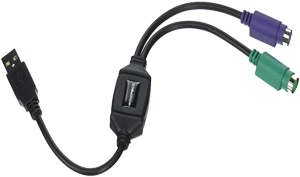
monoprice-ps2-to-usb-keyboard-adapter
(#ad) 

Question from Anita L.:  Hi Rick. I hope you can answer a computer question for me.

I’ve been using computers for over 30 years, but believe it or not I just bought my very first laptop. Yay me!!

Long story short, I love the laptop but absolutely hate the keyboard!

I know that I can buy a new USB keyboard and plug it in and it will work, but I have an old Cherry PS/2 style keyboard that I’ve had for many years. I’d really love to use that keyboard because I love the feel and sound of the mechanical keys.

The problem is my laptop doesn’t have a PS/2 keyboard connector. Is there any way I can make this keyboard work with my laptop? Some kind of adapter maybe?

Thanks for your help. Love your site by the way!!!

Rick’s answer:   [Read more…]

Q&A: My screen is displaying everything sideways! How do I get it back to normal?

Posted on June 5, 2017

microsoft-windowsQuestion from Belinda G.:  Rick, I need your help bad, but please don’t think I’m crazy after you read this!

I was checking my email with my 17 month old on my lap when she started tapping the keyboard. All of a sudden the entire screen image rotated 90 degrees to the right and I can’t figure out how to get it back to normal.

Please help??? I’m tired of having to lay on my side to read the screen! By the way, it’s a Dell desktop computer with Windows 10.

Rick’s answer:   [Read more…]

  • « Previous Page
  • 1
  • 2
  • 3
  • Next Page »

– Ad –
 
Zobirez 10-port 750W USB Fast Charging Station for Multiple Devices

This will charge up to 10 devices (including a laptop) at the same time.

Click here to check it out at Amazon.


Popular…

Miss one of my Daily Gadget Picks? Check here.

How do I ask you a tech question?

Step-by-step guide to completely ridding your PC of viruses and other malware

10 reasons why I recommend buying tech gear from Amazon

How to accurately evaluate product reviews on Amazon


Advertise

Guest Post Guidelines

Want to ask me a tech question?

Recommended Tech Gear

Privacy Policy

Computer Tips
Smartphone Tips
Blogging Tips

Tech Q & A
Reviews
Tech News

Write for RicksDailyTips.com

Scam alerts
Downloads

Copyright © 2026 RicksDailyTips.com

Affiliate Disclaimer


Rick's Daily Tips is hosted by InMotion Hosting. Click here to find out why.

This blog uses cookies to ensure that you receive the best experience on my website. Please click 'Accept Cookies' to continue.