Rick's Daily Tips

Your daily dose of practical, easy to follow tech tips!

  • Home
  • Rick’s Bio
  • Advertise
  • Privacy Policy
  • Rick’s Tip Jar
  • Get My Tech Tips Newsletter
  • Recommended Tech Gear
  • Contact Me

Q&A: Can I disable the tooltips that pop up and cover the text boxes when I’m trying to type on Facebook?

Posted on December 2, 2015

diable-tooltips-logoQuestion from Elise:  I hate it when I’m trying to type a comment or status update on Facebook and a tooltip pops up and won’t let me see what I’m typing.

I use Facebook with both Chrome and Firefox and the problem shows up in both of them. Is there any way to disable the annoying tooltips in those browsers?

Rick’s answer:  [Read more…]
Q&A: Why won’t my external USB hard drive work with my laptop?

Posted on November 27, 2015

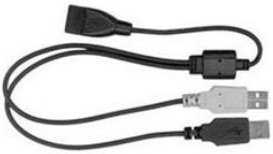
usb-y-adapter-cableQuestion from Carol K.:  I have an older 120GB external USB hard drive that I’ve used for years with my Dell desktop PC.

The Dell bit the dust a couple of weeks ago and I replaced it with a 3 year old Acer laptop that my son gave me after he bought a new one.

The problem I’m having is the old external drive has a bunch of files on it that I really need to access with the laptop, but I can’t get the drive to show up in Windows Explorer.

I know the drive itself is still working because it works fine when I plug it into my computer at work. I’m hoping you can tell me what I need to do to get my old USB hard drive to work with the Acer laptop?

Rick’s answer:   [Read more…]

Q&A: Can I install the free Windows 10 upgrade using just a Windows 7 product key?

Posted on November 25, 2015

Windows-10-logoQuestion from Todd J.:  My company has just informed us that they’re going to replace all of the 3 year old Dell XPS 15 laptops in our division with new machines by the end of the year.

They’re going to remove the hard drives from all the old laptops and destroy them, then give the laptops to us to keep.

I’ve been told that computers running Windows 7 qualify for a free Windows 10 upgrade, but only if Windows 7 is currently installed on the hard drive. The problem is our IT guys are going to remove the hard drives before they transfer ownership of the laptops to us employees.

My question is will I be able to install a replacement hard drive and then download Windows 10 and activate it using the Windows 7 product key that’s printed on the bottom of the machine?

From what I’ve heard it sounds like I’m going to have to buy a copy of Windows too, but I’d like to know for sure so I’ll know what all I need to do in order to get the laptop back up and running again.

Rick’s answer:   [Read more…]

Q&A: Why do some Windows Updates require a system restart but others don’t?

Posted on November 6, 2015

microsoft-windowsQuestion from Leonard G.:  Rick, I have a question about one of my biggest pet peeves. After all these years, why does a computer still have to be restarted after many Windows updates are installed, but other updates install just fine without requiring a restart?

You’d think by now that Microsoft would have figured out a safe and dependable way to install ALL Windows updates in the background with us never even having to know they were installed. I hate having to stop what I’m doing on my computer just so Windows can shut down and “finish” installing an update!

Rick’s answer:   [Read more…]

Q&A: Is it true that Avast Antivirus snoops on our browsing habits?

Posted on November 6, 2015

avast-free-logoQuestion from Mandy G.:  I’ve been using Avast Antivirus for several months after reading how you recommend it, and so far I really like it. Something has me worried though.

A friend of mine told me that Avast uses their software to snoop on our browsing habits. Is that true? And if it is, why do you recommend it?

Rick’s answer:   [Read more…]

  • « Previous Page
  • 1
  • …
  • 205
  • 206
  • 207
  • 208
  • 209
  • …
  • 258
  • Next Page »

– Ad –
Baseus Picogo AM52 10,000mAh Magnetic MagSafe Portable Power Bank/Charger

If you own a smartphone you probably know how handy a portable power bank and charger can be. Well this little gem takes convenience to an entirely new level.

It attaches magnetically to the back of your iPhone and wirelessly charges it when needed. There are no cables to connect and you’ll never have to search for it because it remains attached magnetically right to your phone.

Click here to check it out at Amazon.


Popular…

Miss one of my Daily Gadget Picks? Check here.

How do I ask you a tech question?

Step-by-step guide to completely ridding your PC of viruses and other malware

10 reasons why I recommend buying tech gear from Amazon

How to accurately evaluate product reviews on Amazon


Advertise

Guest Post Guidelines

Want to ask me a tech question?

Recommended Tech Gear

Privacy Policy

Computer Tips
Smartphone Tips
Blogging Tips

Tech Q & A
Reviews
Tech News

Write for RicksDailyTips.com

Scam alerts
Downloads

Copyright © 2026 RicksDailyTips.com

Affiliate Disclaimer


Rick's Daily Tips is hosted by InMotion Hosting. Click here to find out why.

This blog uses cookies to ensure that you receive the best experience on my website. Please click 'Accept Cookies' to continue.