Rick's Daily Tips

Your daily dose of practical, easy to follow tech tips!

  • Home
  • Rick’s Bio
  • Advertise
  • Privacy Policy
  • Rick’s Tip Jar
  • Get My Tech Tips Newsletter
  • Recommended Tech Gear
  • Contact Me

How to create a Wi-Fi hotspot with your Android phone

Posted on January 9, 2013

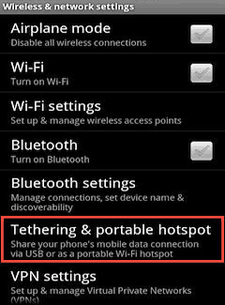
tethering-screenshotWouldn’t it be nice to be able to use your laptop, tablet or other Wi-Fi enabled device at any place where there is a decent 3G or 4G signal available?

Well, if you have a smart phone running Android 2.2 or later you have everything you need to create a Wi-Fi hotspot that can provide Internet service for up to five Wi-Fi enabled devices!

The Android feature for creating a hotspot is called Tethering, and here are the steps for turning it on in your phone:

1 – From your Android phone’s Home screen, tap the Menu button or screen location to go to the Settings screen.

2 – Tap Settings.

3 – Tap Wireless & networks. [Read more…]

  • « Previous Page
  • 1
  • …
  • 15
  • 16
  • 17

– Ad –
Sabrent USB 3.0 Dual Bay Hard Drive Docking Station & Cloner

This is hand-down the easiest way to connect up to two bare hard drives or SSDs to a your computer as external USB drives.

It’s also the easiest way to clone the contents of one drive onto another drive. Simply insert the drives into the docking station and press the “Clone” button!

Click here to check it out at Amazon.


Popular…

Miss one of my Daily Gadget Picks? Check here.

How do I ask you a tech question?

Step-by-step guide to completely ridding your PC of viruses and other malware

10 reasons why I recommend buying tech gear from Amazon

How to accurately evaluate product reviews on Amazon


Advertise

Guest Post Guidelines

Want to ask me a tech question?

Recommended Tech Gear

Privacy Policy

Computer Tips
Smartphone Tips
Blogging Tips

Tech Q & A
Reviews
Tech News

Write for RicksDailyTips.com

Scam alerts
Downloads

Copyright © 2026 RicksDailyTips.com

Affiliate Disclaimer


Rick's Daily Tips is hosted by InMotion Hosting. Click here to find out why.

This blog uses cookies to ensure that you receive the best experience on my website. Please click 'Accept Cookies' to continue.