Rick's Daily Tips

Your daily dose of practical, easy to follow tech tips!

  • Home
  • Rick’s Bio
  • Advertise
  • Privacy Policy
  • Rick’s Tip Jar
  • Get My Tech Tips Newsletter
  • Recommended Tech Gear
  • Contact Me

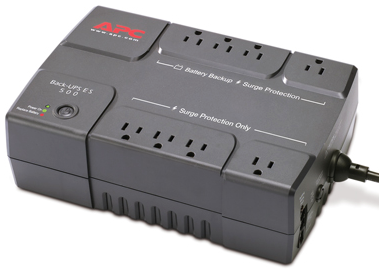
Caution: ALWAYS plug your PC into a battery backup device before updating your motherboard’s BIOS/UEFI firmware!

Posted on October 26, 2019

(#ad)

The motherboard in every Windows PC is equipped with firmware code that the CPU uses to initialize the computer’s hardware components and prepare the machine to boot up into Windows.

Depending on the age and model of your PC, this firmware is typically referred to as either the BIOS or the UEFI.

In a nutshell, the firmware in older PCs is referred to as the BIOS while newer computers have a UEFI Control Panel.

Just keep in mind that regardless of what the manufacturer of your particular motherboard calls it, the onboard firmware performs the same basic “bootstrap” tasks.

Manufacturers occasionally release firmware updates for their motherboards in order to fix bugs, optimize hardware performance and add new features.

Personally, I don’t recommend installing BIOS/UEFI updates unless they are absolutely necessary, for the following reasons:  [Read more…]
How to load the UEFI (BIOS) Setup Screen on computers running Windows 8.1

Posted on May 5, 2015

windows-8-1In times past, loading the BIOS Setup Utility on most any PC was as simple as pressing a special key at the beginning of the boot process.

With some modern laptops and ultrabooks running Windows 8.1 however, it isn’t quite that easy.

But as long as you can boot the PC into Windows, you can load the UEFI (BIOS) Setup Screen from there. Here’s how:  [Read more…]

(Advertisement)

Men’s Journal is a rugged and refined lifestyle adventure travel, food and drink.  Get in touch [email protected] to find out how we can help you reach everyday, affluent, and adventure seeking consumers on Men’s Journal.


Popular…

How do I ask you a tech question?

Step-by-step guide to completely ridding your PC of viruses and other malware

10 reasons why I recommend buying tech gear from Amazon

How to accurately evaluate product reviews on Amazon


Advertise

Guest Post Guidelines

Want to ask me a tech question?

Recommended Tech Gear

Privacy Policy

Computer Tips
Smartphone Tips
Blogging Tips

Tech Q & A
Reviews
Tech News

Write for RicksDailyTips.com

Scam alerts
Downloads

Copyright © 2025 RicksDailyTips.com

Affiliate Disclaimer


Rick's Daily Tips is hosted by InMotion Hosting. Click here to find out why.

This blog uses cookies to ensure that you receive the best experience on my website. Please click 'Accept Cookies' to continue.