Rick's Daily Tips

Your daily dose of practical, easy to follow tech tips!

  • Home
  • Rick’s Bio
  • Advertise
  • Privacy Policy
  • Rick’s Tip Jar
  • Get My Tech Tips Newsletter
  • Recommended Tech Gear
  • Contact Me

Rick’s Daily Pick: Ergonomic Home Office / Computer Chair with Breathable Mesh Back and Headrest

Posted on September 25, 2026

Note: The links in this post are affiliate links.

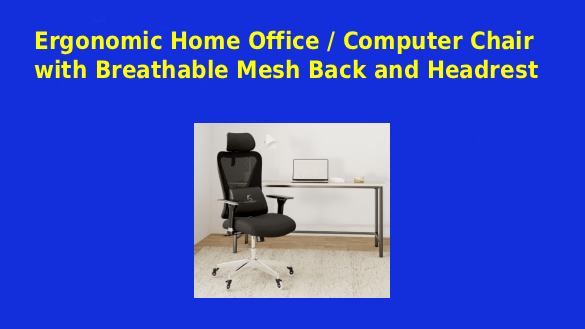
My “Pick” for today is this fantastic Ergonomic Home Office / Computer Chair with Breathable Mesh Back and Headrest.

If the chair you use in your home office or at your computer desk often leaves you with an aching back, this could well be the perfect solution to your back problems.

Everything about this chair was engineered for comfort and relaxation.

Click here to check out this Ergonomic Home Office / Computer Chair with Breathable Mesh Back and Headrest at Amazon.

Did you miss (or want to revisit) one of my earlier picks? You might find it right here.

Picture of the Day: “Sunshine and Silhouettes”

Posted on September 25, 2026

Today’s POTD features a beautiful country scene from rural Washington County, Virginia. This was taken just a short distance from Route 58 on Bethel Road.

What initially caught my attention was the way the sun was placing both the bank on the side of the road and the cloud that’s partially covering the sun in stark silhouette. I hope you like it.

Have lots of treasured photos of your own that you’d love to display in your home but you have limited wall space? A digital picture frame (#ad) is an excellent solution. Check them out!


Enjoy these Pictures of the Day? Sign up for my free Rick’s Tech Tips Newsletter and you’ll never miss one (or any of my tech tips either)!

Monthly Tech Giveaway – September 2026

Posted on July 31, 2026

Note: The links on this page are affiliate links.

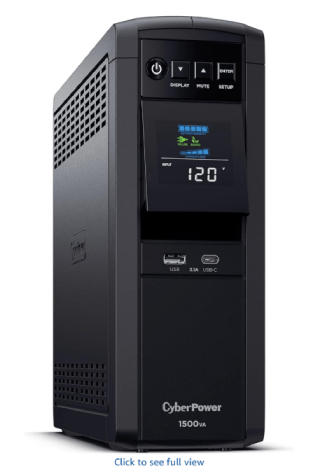
September’s winner will receive a fantastic CyberPower 1500VA/1000W Sinewave UPS Battery Backup / Surge Protector.

This will keep your computer, modem and router online for a full hour after your power goes out, preventing a dangerous instant shutdown that could damage your computer gear and cause you to lose any unsaved data that’s currently in the machine’s RAM.

All subscribers to the Standard edition of my Rick’s Tech Tips Newsletter have an equal chance to win.

Premium subscribers have two chances to win (their email addresses are added to the “pot” twice).

Not a subscriber? Just enter your email address in the sign-up form on this page.

Once subscribed you’ll be eligible to win each month’s drawing – starting with this month. Better yet, opt for a Premium subscription for double the chance to win!

The drawing for this month’s prize will be held on September 30 and the winner will be notified by email. The winner will be selected at random.

Good luck!

Q&A: How do I set Windows 11’s Power Mode to ‘Best Performance’?

Posted on September 25, 2026

Want to get my easy to follow Tech Tips in your email?
Sign up for my daily Rick’s Tech Tips Newsletter!


Question from Keegan:  I recently updated my PC from Windows 10 to Windows 11.

With Windows 10 I had the power mode set to “Best Performance”, but I can’t figure out how to change it in Windows 11.

I could be imagining things, but it seems like Microsoft made a lot of changes to the Windows interface.

How do I set my computer’s power setting to “Best Performance” now that Windows 11 is on it?  [Read more…]

Why you should never run two antivirus apps at the same time

Posted on September 24, 2026

Want to get my easy to follow Tech Tips in your email?

Sign up for my daily Rick’s Tech Tips Newsletter!


I’m often asked to remove viruses and other forms of malware from ailing computers, and many of those machines are running two or more antivirus programs at once.

The problem is, when it comes to antivirus apps, more is not better. I know that probably sounds like it can’t be true, but it actually is.

Before I discuss why that is, here’s a quick overview of the two primary types of anti-malware programs:  [Read more…]

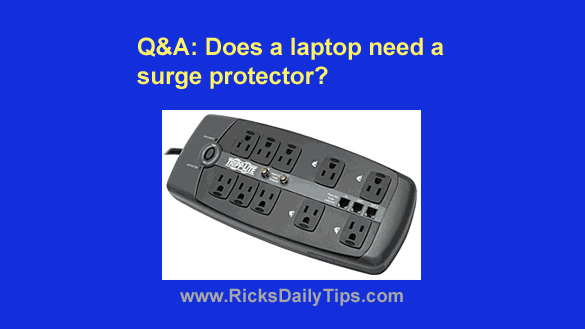
Q&A: Does a laptop need a surge protector?

Posted on September 23, 2026

Want to get my easy to follow Tech Tips in your email?

Sign up for my daily Rick’s Tech Tips Newsletter!


Note: The links in this post are affiliate links.

Question from Della:  I just bought my son a new laptop at our local big box store.

As we were walking up to the register to pay, I asked the salesman if he could recommend a good surge protector for it.

He said laptops don’t need surge protectors because they aren’t connected to the power grid while you’re using them and the chargers that come with them have surge protection built into them.

That just didn’t sound right to me. Was he right or do I need to go ahead and buy a surge protector for my son’s new laptop?  [Read more…]

  • 1
  • 2
  • 3
  • …
  • 801
  • Next Page »

– Ad –
Pecron E1500LFP 1536Wh/2200W Portable Power Station w/ 200W Solar Panel

Winter is just around the corner and that means snow and ice will be bringing down power lines all across the country. Are you prepared for your next extended power outage?

This will keep your fridge, freezer, CPAP machine, TV or computer gear powered up for several hours, giving the power company time to get the grid back online. And if the power is off for days you can recharge it with the included solar panel.

Click here to check it out at Amazon.


Popular…

Miss one of my Daily Gadget Picks? Check here.

How do I ask you a tech question?

Step-by-step guide to completely ridding your PC of viruses and other malware

10 reasons why I recommend buying tech gear from Amazon

How to accurately evaluate product reviews on Amazon


Advertise

Guest Post Guidelines

Want to ask me a tech question?

Recommended Tech Gear

Privacy Policy

Computer Tips
Smartphone Tips
Blogging Tips

Tech Q & A
Reviews
Tech News

Write for RicksDailyTips.com

Scam alerts
Downloads

Copyright © 2026 RicksDailyTips.com

Affiliate Disclaimer


Rick's Daily Tips is hosted by InMotion Hosting. Click here to find out why.

This blog uses cookies to ensure that you receive the best experience on my website. Please click 'Accept Cookies' to continue.