For various reasons we often need to minimize all the open windows in order to see the Desktop. Instead of clicking the minimize button for each window one by one we can minimize all the windows at once with a single mouse click or keystroke – your choice. Here’s how:
 1 – Click the “Show Desktop” icon located in the Quick Launch toolbar in the lower left corner of the screen. In the screenshot at right the “Show Desktop” icon is the first icon to the right of the “Start” orb. It might be in a different position on your screen. To restore the windows back onto the screen, simply click the icon again. Note: Windows 7 doesn’t display the Quick Launch toolbar by default so you’ll need to use option 2 below…
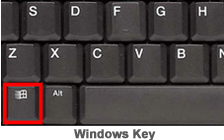 2 – Hold down the “Windows” key and press the “D” key. You’ll typically find the “Windows” key at the lower left corner of the keyboard between the “CTRL” and “ALT” keys. (Refer to the image at right.) Pressing Windows-D again will restore all the windows back onto the screen.