 Not that long ago, a roof inspection meant a guy with a clipboard, a tape measure and maybe a few blurry snapshots. These days the inspection often ends with a file packed with aerial photos, measurements, heat maps and color-coded markup. It’s useful stuff, but only if you know how to read it.
If you own or manage a business building, the next report you get from a commercial roofing company will probably look more like a tech dossier than a handwritten estimate. That’s good news for you, because data is much harder to fudge than a verbal “yeah, it’s pretty bad up there.”
In this post I’ll walk you through what’s inside a modern roof report, how to make sense of each section, and which files you should ask for before you sign anything.
What’s Inside a Modern Roof Report
Every company formats its reports a little differently, but most include the same core sections. Here’s a quick map of what you’re likely to see.
| Section | What it shows | Technology behind it | What to check |
| Measurements | Roof area, slopes, edges, openings | Satellite or drone imagery | Total area matches the bid |
| Drone photos | Overview and close-up views of the surface | Camera drone | Dates, locations, clarity |
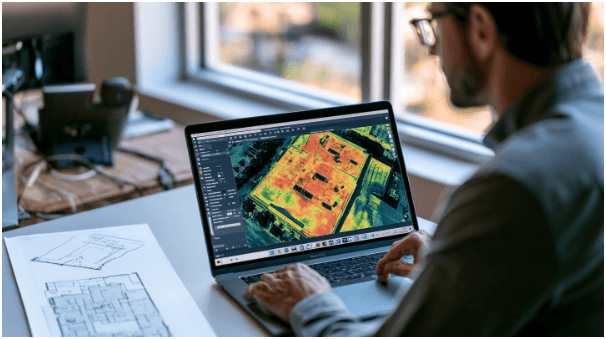
| Thermal map | Warm and cool zones across the roof | Infrared camera | When and how it was captured |
| Damage markup | Numbered pins on a roof diagram | Inspection software | Each pin has a matching photo |
| Core samples | What the roof layers look like inside | Small cut samples | Where they were taken and results |
| Summary | Condition rating and recommendations | Inspector’s judgment | Clear reasons for each recommendation |
Aerial Measurements: Checking the Math
Area drives price, so this is the part of the report worth double-checking first. Small measurement differences turn into big dollar differences on a commercial roof.
Satellite and Drone Measurement Reports
Many contractors order measurements built from high-resolution aerial or satellite imagery, and some fly their own drones to map the roof. Either way, you should see a diagram with every section labeled and a total at the bottom.
Square Feet, Roofing Squares and Waste Factors
Roofers often price by the “square,” and one roofing square equals 100 square feet. A 20,000-square-foot roof is 200 squares. Bids also add a waste factor for trimming and overlaps, so the material quantity will run a bit higher than the measured area.
Why the Numbers Differ Between Bids
If two companies measured the same roof and got totals that differ by a lot, ask each one to show its diagram. Often one included parapet walls, penthouse roofs or equipment curbs and the other didn’t.
Drone Photos: Knowing What You’re Looking At
A report might include hundreds of images. They’re only helpful if you can tell what each one shows and when it was taken.
Overview Shots vs Close-Ups
Overview shots show the whole roof and help you orient yourself. Close-ups show the actual problems, like split seams, blisters or ponding water. A good report pairs each close-up with a marker on the overview so you know exactly where it is.
Checking GPS Tags and Timestamps
Here’s a quick tip. If the company sends you the original photo files, you can check when and where each one was taken. On a Windows PC, right-click the photo, choose Properties, then click the Details tab. You’ll see the date taken and, if the drone recorded it, the GPS latitude and longitude. That’s a simple way to confirm the photos actually came from your building and from this inspection.
Who Flew the Drone
In the U.S., anyone flying a drone for business needs a remote pilot certificate under the FAA’s Part 107 rules. It’s perfectly reasonable to ask for a copy.
Thermal Images: Reading the Heat Map
This is the most high-tech part of the report, and honestly, the one people misread most often. A red blob doesn’t automatically mean a leak.
Why the Survey Happens After Sunset
The industry standard for this work, ASTM C1153, covers infrared imaging done at night, either from the roof surface or from the air. During the day the roof soaks up heat. After sunset, wet insulation holds that heat longer than dry insulation, so soggy areas show up as warm spots, often starting roughly an hour after dark. The standard also sets requirements for camera equipment and weather conditions, so the report should list when the scan was done and what the weather was like.
Warm Spots, Cold Spots and False Alarms
Some roof surfaces make thermal images tricky to read. Gravel ballast, standing seam metal panels and reflective coatings can hide or distort the heat pattern. A careful inspector will flag those areas so nobody mistakes an odd color for a problem.
Why Core Samples Still Matter
ASTM C1153 helps locate wet insulation, but it doesn’t identify what caused the moisture or where the water got in. That’s why good reports back up thermal findings with small core cuts that show what’s really going on inside the roof.
Damage Markups and Recommendations
The markup ties everything together. It turns a pile of images into a list of specific problems.
Matching Numbered Pins to Photos
Each numbered pin on the roof diagram should correspond to at least one photo and a short description. If you find a pin with no photo, ask about it.
Reading “Repair” vs “Replace” Language
A strong report explains why it recommends each action. Look for specifics, like the percentage of wet insulation or the number of failed seams. A vague line about the roof being “at the end of its life” doesn’t tell you much by itself.
Files to Ask For Before You Sign Anything
The PDF is just the summary. Before you commit to any work, ask for:
- The complete PDF report
- Original full-resolution photos with metadata
- Radiometric thermal images with temperature data
- The separate measurement report
- A marked-up roof diagram
- Date, time and weather of the survey
- Core sample locations and results
- A copy of the drone pilot’s certificate
Keeping Your Roof Files Organized
Once you have everything, put it in its own cloud folder and name each file with the date, like “2026-09 Roof Inspection Report.” Keep a second copy on an external drive. You’ll want these files if you ever file an insurance claim or sell the building.
Getting a Digital Roof Report in the Mid-Atlantic
If your building is in Pennsylvania, New Jersey or Delaware, Paramount Home Solutions is a GAF Master Elite contractor that handles commercial roofing, and one customer review mentions receiving drone shots of the roof as the project progressed. Whichever company you call, compare the reports before you compare the prices. The company that shows its work in detail is usually the one whose numbers you can trust.