Rick's Daily Tips

Your daily dose of practical, easy to follow tech tips!

  • Home
  • Rick’s Bio
  • Advertise
  • Privacy Policy
  • Rick’s Tip Jar
  • Get My Tech Tips Newsletter
  • Recommended Tech Gear
  • Contact Me
You are here: Home / Computer Tips / Super Control Panel – Access all Control Panel tools and settings from one screen!

Super Control Panel – Access all Control Panel tools and settings from one screen!

Posted on April 12, 2013

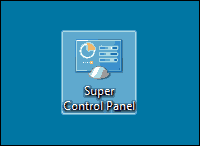
super-control-panelThe Windows Control Panel contains dozens of tools and settings for tweaking the way Windows performs many of its numerous tasks.

Most of these tools and settings are nested underneath a plethora of menus, making it difficult to find exactly what you’re looking for without doing a bunch of clicking and searching.

Lucky for us, there’s a very simple way to create a handy Super Control Panel app that lists every single Control Panel tool and setting on a single page, neatly filed under one of several easy-to-understand categories. Here’s the simple two-step process for creating your very own Super Control Panel: 

Note: The following procedure works in Windows 7, Windows 8 and Windows 8.1.

1 – Right-click on the Windows Desktop and click New>Folder.

2 – Give that new folder this name:

Super Control Panel.{ED7BA470-8E54-465E-825C-99712043E01C}

You’re done! From now on you’ll be able to double-click on the Super Control Panel icon and launch any Control Panel tool with a single mouse click!


(Advertisement)

A great laptop for the money…


Lenovo Laptop Computer for Business, Home and Student

  Intel Dual-Core Processor | 16GB RAM |
1TB SSD | Windows 11 Pro

Click here to check it out!


Popular…

How do I ask you a tech question?

Step-by-step guide to completely ridding your PC of viruses and other malware

10 reasons why I recommend buying tech gear from Amazon

How to accurately evaluate product reviews on Amazon


Advertise

Guest Post Guidelines

Want to ask me a tech question?

Recommended Tech Gear

Privacy Policy

Computer Tips
Smartphone Tips
Blogging Tips

Tech Q & A
Reviews
Tech News

Write for RicksDailyTips.com

Scam alerts
Downloads

Copyright © 2025 RicksDailyTips.com

Affiliate Disclaimer


Rick's Daily Tips is hosted by InMotion Hosting. Click here to find out why.

This blog uses cookies to ensure that you receive the best experience on my website. Please click 'Accept Cookies' to continue.